Time Tracker with Alto3.3.7
Publisher Description


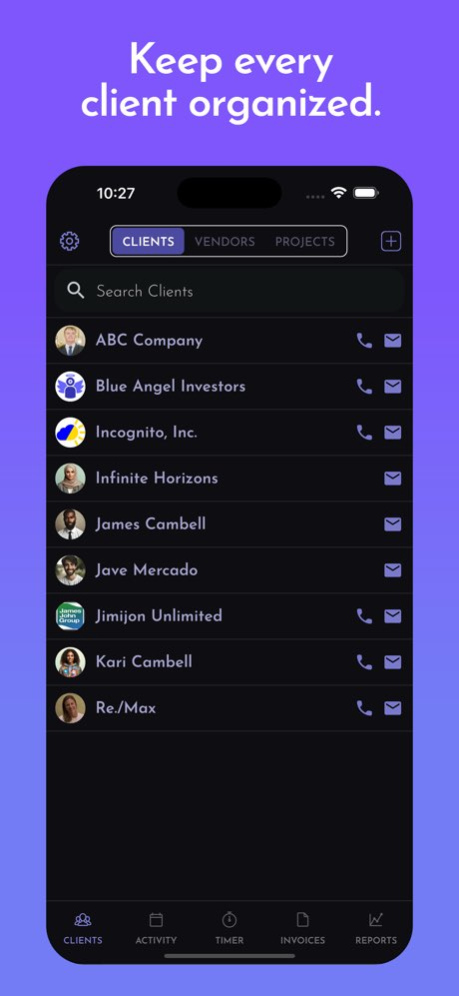

Time Tracker is the easiest way to track your working hours and create invoices in minutes. Whether you work alone or with a team, Time Tracker helps you log time, manage expenses, and bill clients fast.
Built for freelancers, small businesses, and contractors, Time Tracker is perfect for designers, developers, consultants, movers, landscapers, musicians, and more. You can use Time Tracker on its own or sync it with our companion app, Invoice & Estimate with Alto, to manage invoices, estimates, payments, and client information across all your devices.
Top features include:
» Start, pause, and log billable hours with a simple timer
» Attach expenses, receipts, photos, and files to your sessions
» Create and send professional invoices right from the app
» Sync time entries with your calendar
» Set up clients quickly using your contacts
Time Tracker gives you even more ways to work smarter:
» Track time for each client and easily import your hours into invoices
» Assign work and let your team members log hours and create invoices
» Accept credit card, debit card, and PayPal payments using Stripe, or PayPal
» Link receipts, photos, code commits, and project notes and your photos
» Import clients from your address book and get reminders to invoice on time
Start today and take control of your time.
Version History Bug fixes and performance improvements. 3.3.7 Aug 5 Sort new invoice correctly After adding a new invoice and introducing Google Calendar events. 3.3.6 Jun 22 Improvements to Importing.
Invoice Creation Improvement.
Maintenance Release. 3.3.5 Jan 15 * Importer improvements
* Important notice to iOS Alto Invoice and Estimate users, you must now import your data to Alto Timer Pro as we are discontinuing support for the iOS app. Note: To import your data, you must have a valid Alto Invoice and Estimate email and password.
* If this is a new install you will be prompted to import your data, if you have been using the Alto Timer app already you need to delete you current data first. Goto settings and select Delete Account, this will take you back to the Import Data Alert and you can then import your iOS Alto Invoice and Estimate data.
3,432 3.3.4 12/24/2025 * Important notice to iOS Alto Invoice and Estimate users, you must now import your data to Time Tracker as we are discontinuing support for the iOS app. Note: To import your data, you must have a valid Alto Invoice and Estimate email and password.
* If this is a new install you will be prompted to import your data, if you have been using the Time Tracker app already you need to delete you current data first. Goto settings and select Delete Account, this will take you back to the Import Data Alert and you can then import your iOS Alto Invoice and Estimate data. 3.3.3 12/19/2025 Maintenance release to sync with Invoice App. 3.3.2 11/05/2025 Maintenance release to sync with Invoice and Estimates app
Minor bug fixes 3.3.1 10/23/2025 Maintenance release to sync with the Alto Invoice & Estimates app. 3.3.0 07/07/2025 Maintenance release to sync with the Alto Invoice & Estimates app. 3.2.9 07/01/2025 Maintenance release to sync with the Alto Invoice & Estimates app. 3.2.8 06/27/2025 Fix major data entry bug. 3.2.7 06/26/2025 Maintenance release to sync with invoicing app fixes. 3.2.6 06/24/2025 Maintenance release to sync with invoicing app changes. 3.2.5 06/20/2025 * Maintenance release to sync with invoicing app
* Minor Bug fixes 3.2.4 06/18/2025 * Maintenance release
* Minor Bug fixes 3.2.3 05/28/2025 Maintenance release to sync with new version of Alto Invoice and Estimates. 3.2.2 05/06/2025 Maintenance release to address bug fixes in Aito Invoice. 3.2.1 04/10/2025 Maintenance release to address bug fixes in Aito Invoice. 3.2.0 04/04/2025 Maintenance release to keep in sync with the Alto Invoicing application. 3.1.9 04/04/2025 Maintenance release, update the app to the latest Apple updates, and sync with Alto Invoice changes. 3.1.8 02/27/2025 Maintenance release, update the app to the latest Apple updates. 3.1.7 12/31/2024 1. Estimates category Hours now show millage cost entry for start end ending miles.
2. Maintenance Release to Match Alto Invoice changes 3.1.6 09/11/2024 Maintenance Release to Match Alto Invoice changes 3.1.5 08/23/2024 Maintenance Release to Match Alto Invoice changes 3.1.4 08/16/2024 Contacts and project picker to show all clients and projects now. 3.1.3 07/28/2024
About Time Tracker with Alto
The company that develops Time Tracker with Alto is James John Group, LLC. The latest version released by its developer is 3.3.7.
To install Time Tracker with Alto on your iOS device, just click the green Continue To App button above to start the installation process. The app is listed on our website since 2026-10-15 and was downloaded 4 times. We have already checked if the download link is safe, however for your own protection we recommend that you scan the downloaded app with your antivirus. Your antivirus may detect the Time Tracker with Alto as malware if the download link is broken.
How to install Time Tracker with Alto on your iOS device:
- Click on the Continue To App button on our website. This will redirect you to the App Store.
- Once the Time Tracker with Alto is shown in the iTunes listing of your iOS device, you can start its download and installation. Tap on the GET button to the right of the app to start downloading it.
- If you are not logged-in the iOS appstore app, you'll be prompted for your your Apple ID and/or password.
- After Time Tracker with Alto is downloaded, you'll see an INSTALL button to the right. Tap on it to start the actual installation of the iOS app.
- Once installation is finished you can tap on the OPEN button to start it. Its icon will also be added to your device home screen.
Program Details
System requirements
Download information
Pricing
Version History
version 3.3.7
posted on 2026-10-15
Version History Bug fixes and performance improvements. 3.3.7 Aug 5 Sort new invoice correctly After adding a new invoice and introducing Google Calendar events. 3.3.6 Jun 22 Improvements to Importing.
Invoice Creation Improvement.
Maintenance Release. 3.3.5 Jan 15 * Importer improvements
* Important notice to iOS Alto Invoice and Estimate users, you must now import your data to Alto Timer Pro as we are discontinuing support for the iOS app. Note: To import your data, you must have a valid Alto Invoice and Estimate email and password.
* If this is a new install you will be prompted to import your data, if you have been using the Alto Timer app already you need to delete you current data first. Goto settings and select Delete Account, this will take you back to the Import Data Alert and you can then import your iOS Alto Invoice and Estimate data.
3,432 3.3.4 12/24/2025 * Important notice to iOS Alto Invoice and Estimate users, you must now import your data to Time Tracker as we are discontinuing support for the iOS app. Note: To import your data, you must have a valid Alto Invoice and Estimate email and password.
* If this is a new install you will be prompted to import your data, if you have been using the Time Tracker app already you need to delete you current data first. Goto settings and select Delete Account, this will take you back to the Import Data Alert and you can then import your iOS Alto Invoice and Estimate data. 3.3.3 12/19/2025 Maintenance release to sync with Invoice App. 3.3.2 11/05/2025 Maintenance release to sync with Invoice and Estimates app
Minor bug fixes 3.3.1 10/23/2025 Maintenance release to sync with the Alto Invoice & Estimates app. 3.3.0 07/07/2025 Maintenance release to sync with the Alto Invoice & Estimates app. 3.2.9 07/01/2025 Maintenance release to sync with the Alto Invoice & Estimates app. 3.2.8 06/27/2025 Fix major data entry bug. 3.2.7 06/26/2025 Maintenance release to sync with invoicing app fixes. 3.2.6 06/24/2025 Maintenance release to sync with invoicing app changes. 3.2.5 06/20/2025 * Maintenance release to sync with invoicing app
* Minor Bug fixes 3.2.4 06/18/2025 * Maintenance release
* Minor Bug fixes 3.2.3 05/28/2025 Maintenance release to sync with new version of Alto Invoice and Estimates. 3.2.2 05/06/2025 Maintenance release to address bug fixes in Aito Invoice. 3.2.1 04/10/2025 Maintenance release to address bug fixes in Aito Invoice. 3.2.0 04/04/2025 Maintenance release to keep in sync with the Alto Invoicing application. 3.1.9 04/04/2025 Maintenance release, update the app to the latest Apple updates, and sync with Alto Invoice changes. 3.1.8 02/27/2025 Maintenance release, update the app to the latest Apple updates. 3.1.7 12/31/2024 1. Estimates category Hours now show millage cost entry for start end ending miles.
2. Maintenance Release to Match Alto Invoice changes 3.1.6 09/11/2024 Maintenance Release to Match Alto Invoice changes 3.1.5 08/23/2024 Maintenance Release to Match Alto Invoice changes 3.1.4 08/16/2024 Contacts and project picker to show all clients and projects now. 3.1.3 07/28/2024
version 3.3.6
posted on 2026-07-23
Version History Sort new invoice correctly After adding a new invoice and introducing Google Calendar events. 3.3.6 Jun 22 Improvements to Importing.
Invoice Creation Improvement.
Maintenance Release. 3.3.5 Jan 15 * Importer improvements
* Important notice to iOS Alto Invoice and Estimate users, you must now import your data to Alto Timer Pro as we are discontinuing support for the iOS app. Note: To import your data, you must have a valid Alto Invoice and Estimate email and password.
* If this is a new install you will be prompted to import your data, if you have been using the Alto Timer app already you need to delete you current data first. Goto settings and select Delete Account, this will take you back to the Import Data Alert and you can then import your iOS Alto Invoice and Estimate data.
3,432 3.3.4 12/24/2025 * Important notice to iOS Alto Invoice and Estimate users, you must now import your data to Time Tracker as we are discontinuing support for the iOS app. Note: To import your data, you must have a valid Alto Invoice and Estimate email and password.
* If this is a new install you will be prompted to import your data, if you have been using the Time Tracker app already you need to delete you current data first. Goto settings and select Delete Account, this will take you back to the Import Data Alert and you can then import your iOS Alto Invoice and Estimate data. 3.3.3 12/19/2025 Maintenance release to sync with Invoice App. 3.3.2 11/05/2025 Maintenance release to sync with Invoice and Estimates app
Minor bug fixes 3.3.1 10/23/2025 Maintenance release to sync with the Alto Invoice & Estimates app. 3.3.0 07/07/2025 Maintenance release to sync with the Alto Invoice & Estimates app. 3.2.9 07/01/2025 Maintenance release to sync with the Alto Invoice & Estimates app. 3.2.8 06/27/2025 Fix major data entry bug. 3.2.7 06/26/2025 Maintenance release to sync with invoicing app fixes. 3.2.6 06/24/2025 Maintenance release to sync with invoicing app changes. 3.2.5 06/20/2025 * Maintenance release to sync with invoicing app
* Minor Bug fixes 3.2.4 06/18/2025 * Maintenance release
* Minor Bug fixes 3.2.3 05/28/2025 Maintenance release to sync with new version of Alto Invoice and Estimates. 3.2.2 05/06/2025 Maintenance release to address bug fixes in Aito Invoice. 3.2.1 04/10/2025 Maintenance release to address bug fixes in Aito Invoice. 3.2.0 04/04/2025 Maintenance release to keep in sync with the Alto Invoicing application. 3.1.9 04/04/2025 Maintenance release, update the app to the latest Apple updates, and sync with Alto Invoice changes. 3.1.8 02/27/2025 Maintenance release, update the app to the latest Apple updates. 3.1.7 12/31/2024 1. Estimates category Hours now show millage cost entry for start end ending miles.
2. Maintenance Release to Match Alto Invoice changes 3.1.6 09/11/2024 Maintenance Release to Match Alto Invoice changes 3.1.5 08/23/2024 Maintenance Release to Match Alto Invoice changes 3.1.4 08/16/2024 Contacts and project picker to show all clients and projects now. 3.1.3 07/28/2024 1. Maintenace release.
2. Fix the activity and expense attachment image viewer not showing photos. 3.1.2 07/25/2024
version 3.3.6
posted on 2026-06-27
Version History Sort new invoice correctly After adding a new invoice and introducing Google Calendar events. 3.3.6 5d ago Improvements to Importing.
Invoice Creation Improvement.
Maintenance Release. 3.3.5 Jan 15 * Importer improvements
* Important notice to iOS Alto Invoice and Estimate users, you must now import your data to Alto Timer Pro as we are discontinuing support for the iOS app. Note: To import your data, you must have a valid Alto Invoice and Estimate email and password.
* If this is a new install you will be prompted to import your data, if you have been using the Alto Timer app already you need to delete you current data first. Goto settings and select Delete Account, this will take you back to the Import Data Alert and you can then import your iOS Alto Invoice and Estimate data.
3,432 3.3.4 12/24/2025 * Important notice to iOS Alto Invoice and Estimate users, you must now import your data to Time Tracker as we are discontinuing support for the iOS app. Note: To import your data, you must have a valid Alto Invoice and Estimate email and password.
* If this is a new install you will be prompted to import your data, if you have been using the Time Tracker app already you need to delete you current data first. Goto settings and select Delete Account, this will take you back to the Import Data Alert and you can then import your iOS Alto Invoice and Estimate data. 3.3.3 12/19/2025 Maintenance release to sync with Invoice App. 3.3.2 11/05/2025 Maintenance release to sync with Invoice and Estimates app
Minor bug fixes 3.3.1 10/23/2025 Maintenance release to sync with the Alto Invoice & Estimates app. 3.3.0 07/07/2025 Maintenance release to sync with the Alto Invoice & Estimates app. 3.2.9 07/01/2025 Maintenance release to sync with the Alto Invoice & Estimates app. 3.2.8 06/27/2025 Fix major data entry bug. 3.2.7 06/26/2025 Maintenance release to sync with invoicing app fixes. 3.2.6 06/24/2025 Maintenance release to sync with invoicing app changes. 3.2.5 06/20/2025 * Maintenance release to sync with invoicing app
* Minor Bug fixes 3.2.4 06/18/2025 * Maintenance release
* Minor Bug fixes 3.2.3 05/28/2025 Maintenance release to sync with new version of Alto Invoice and Estimates. 3.2.2 05/06/2025 Maintenance release to address bug fixes in Aito Invoice. 3.2.1 04/10/2025 Maintenance release to address bug fixes in Aito Invoice. 3.2.0 04/04/2025 Maintenance release to keep in sync with the Alto Invoicing application. 3.1.9 04/04/2025 Maintenance release, update the app to the latest Apple updates, and sync with Alto Invoice changes. 3.1.8 02/27/2025 Maintenance release, update the app to the latest Apple updates. 3.1.7 12/31/2024 1. Estimates category Hours now show millage cost entry for start end ending miles.
2. Maintenance Release to Match Alto Invoice changes 3.1.6 09/11/2024 Maintenance Release to Match Alto Invoice changes 3.1.5 08/23/2024 Maintenance Release to Match Alto Invoice changes 3.1.4 08/16/2024 Contacts and project picker to show all clients and projects now. 3.1.3 07/28/2024 1. Maintenace release.
2. Fix the activity and expense attachment image viewer not showing photos. 3.1.2 07/25/2024
version 3.3.5
posted on 2026-05-26
Version History Improvements to Importing.
Invoice Creation Improvement.
Maintenance Release. 3.3.5 Jan 15 * Importer improvements
* Important notice to iOS Alto Invoice and Estimate users, you must now import your data to Alto Timer Pro as we are discontinuing support for the iOS app. Note: To import your data, you must have a valid Alto Invoice and Estimate email and password.
* If this is a new install you will be prompted to import your data, if you have been using the Alto Timer app already you need to delete you current data first. Goto settings and select Delete Account, this will take you back to the Import Data Alert and you can then import your iOS Alto Invoice and Estimate data.
3,432 3.3.4 12/24/2025 * Important notice to iOS Alto Invoice and Estimate users, you must now import your data to Time Tracker as we are discontinuing support for the iOS app. Note: To import your data, you must have a valid Alto Invoice and Estimate email and password.
* If this is a new install you will be prompted to import your data, if you have been using the Time Tracker app already you need to delete you current data first. Goto settings and select Delete Account, this will take you back to the Import Data Alert and you can then import your iOS Alto Invoice and Estimate data. 3.3.3 12/19/2025 Maintenance release to sync with Invoice App. 3.3.2 11/05/2025 Maintenance release to sync with Invoice and Estimates app
Minor bug fixes 3.3.1 10/23/2025 Maintenance release to sync with the Alto Invoice & Estimates app. 3.3.0 07/07/2025 Maintenance release to sync with the Alto Invoice & Estimates app. 3.2.9 07/01/2025 Maintenance release to sync with the Alto Invoice & Estimates app. 3.2.8 06/27/2025 Fix major data entry bug. 3.2.7 06/26/2025 Maintenance release to sync with invoicing app fixes. 3.2.6 06/24/2025 Maintenance release to sync with invoicing app changes. 3.2.5 06/20/2025 * Maintenance release to sync with invoicing app
* Minor Bug fixes 3.2.4 06/18/2025 * Maintenance release
* Minor Bug fixes 3.2.3 05/28/2025 Maintenance release to sync with new version of Alto Invoice and Estimates. 3.2.2 05/06/2025 Maintenance release to address bug fixes in Aito Invoice. 3.2.1 04/10/2025 Maintenance release to address bug fixes in Aito Invoice. 3.2.0 04/04/2025 Maintenance release to keep in sync with the Alto Invoicing application. 3.1.9 04/04/2025 Maintenance release, update the app to the latest Apple updates, and sync with Alto Invoice changes. 3.1.8 02/27/2025 Maintenance release, update the app to the latest Apple updates. 3.1.7 12/31/2024 1. Estimates category Hours now show millage cost entry for start end ending miles.
2. Maintenance Release to Match Alto Invoice changes 3.1.6 09/11/2024 Maintenance Release to Match Alto Invoice changes 3.1.5 08/23/2024 Maintenance Release to Match Alto Invoice changes 3.1.4 08/16/2024 Contacts and project picker to show all clients and projects now. 3.1.3 07/28/2024 1. Maintenace release.
2. Fix the activity and expense attachment image viewer not showing photos. 3.1.2 07/25/2024 Maintenance release to keep backend data files in sync with the new Alto Invoice release. 3.1.1 07/10/2024
version 3.3.5
posted on 2026-01-15
Improvements to Importing.
Invoice Creation Improvement.
Maintenance Release.
version 3.3.0
posted on 2025-07-07
Jul 7, 2025
Version 3.3.0
Maintenance release to sync with the Alto Invoice & Estimates app.
version 3.2.3
posted on 2025-05-28
May 28, 2025
Version 3.2.3
* Maintenance release
* Minor Bug fixes
version 3.2.2
posted on 2025-05-06
May 6, 2025
Version 3.2.2
Maintenance release to sync with new version of Alto Invoice and Estimates.
version 3.2.1
posted on 2025-04-10
Apr 10, 2025
Version 3.2.1
Maintenance release to address bug fixes in Aito Invoice.
version 3.2.0
posted on 2025-04-04
Apr 4, 2025
Version 3.2.0
Maintenance release to address bug fixes in Aito Invoice.
